Getting started
To start using wagtailtrans in your project, take the following steps:
Installation
- Install Wagtailtrans via
pip
$ pip install wagtailtrans
- Add
wagtailtrans,wagtail.contrib.modeladminand if you’re using languages per sitewagtail.contrib.settingsto yourINSTALLED_APPS:
INSTALLED_APPS = [
    # ...
    'wagtail.contrib.modeladmin',
    'wagtail.contrib.settings',  # Only required when WAGTAILTRANS_LANGUAGES_PER_SITE=True
    'wagtailtrans',
    # ...
]
Note
As of Wagtailtrans 1.0.3 the custom Language management views are replaced with with wagtail.contrib.modeladmin
This needs to be added to INSTALLED_APPS as well.
- Add
wagtailtrans.middleware.TranslationMiddlewareto yourMIDDLEWARE_CLASSES:
MIDDLEWARE_CLASSES = [
    # ...
    'django.contrib.sessions.middleware.SessionMiddleware',
    'wagtail.core.middleware.SiteMiddleware',
    'wagtailtrans.middleware.TranslationMiddleware',
    'django.middleware.common.CommonMiddleware',
    # ...
]
Note
Keep in mind wagtailtrans.middleware.TranslationMiddleware is a replacement for django.middleware.locale.LocaleMiddleware.
Note
It relies on wagtail.core.middleware.SiteMiddleware, which should come before it.
See http://docs.wagtail.io/en/latest/getting_started/integrating_into_django.html#settings for more information.
Configuration
Before we start incorporating wagtailtrans in your project, you’ll need to configure wagtailtrans for the behavior that best suits the need of your project. The required settings to consider here are:
WAGTAILTRANS_SYNC_TREEWAGTAILTRANS_LANGUAGES_PER_SITE
Both settings are mandatory but provided with a default value, so if you want synchronized trees and no languages per site, you’re good to go from here.
See also
Complete reference about available settings: Settings
Incorporating
To start using wagtailtrans we first need to create a translation home page. This page will route the requests to the homepage in the right language. We can create a translation site root page by creating the wagtailtrans.models.TranslatableSiteRootPage as the first page under the root page.
In this example we will also make a HomePage which will be translatable. This is done by implementing the wagtailtrans.models.TranslatablePage instead of Wagtail’s Page
from wagtailtrans.models import TranslatablePage


class HomePage(TranslatablePage):
    body = RichTextField(blank=True, default="")
    image = models.ForeignKey('wagtailimages.Image', null=True, blank=True, on_delete=models.SET_NULL, related_name='+')

    content_panels = Page.content_panels + [
        FieldPanel('body'),
        ImageChooserPanel('image')
    ]

    subpage_types = [
        # Your subpage types.
    ]
This will create our first translatable page. To start using it we first need to migrate our database
$ python manage.py makemigrations
$ python manage.py migrate
Now run the server and under the page Root create a TranslatableSiteRootPage (MySite).
Next we need to create a site and point it’s root_page to our TranslatableSiteRootPage (MySite).
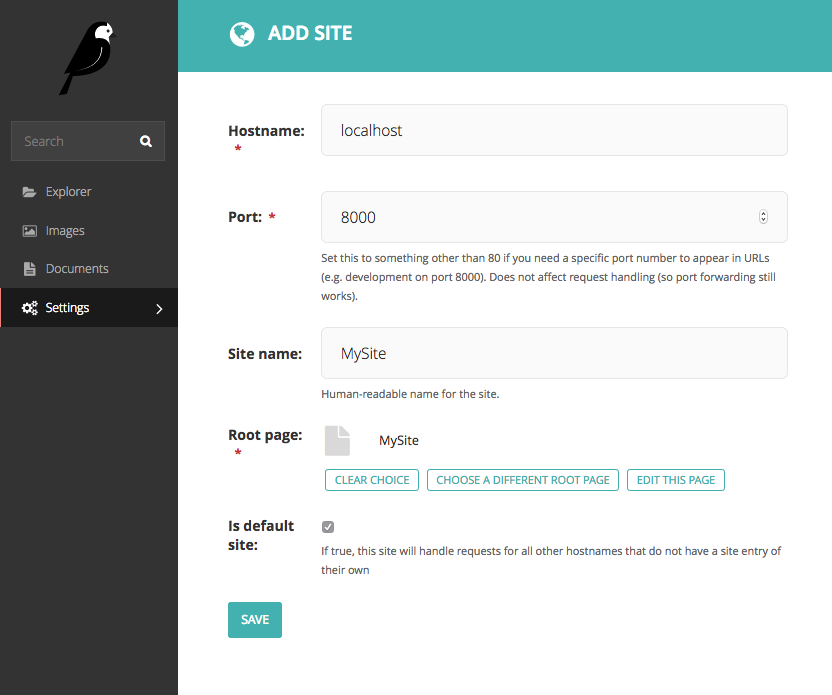
We now have the basics for a Translatable Site.